

Picture this: you’ve spent months building up a library of blog posts, each one carefully researched, written and edited. But here’s the thing that most bloggers don’t like to hear. Some of that content you worked so hard on could actually be harming your website’s visibility rather than benefiting it. Outdated stats, broken links, and stale advice don’t just sit there quietly. They send signals to search engines (and your readers) that your site is lagging behind current times.
The reality? You don’t have to start over. A smart content refresh can breathe new life into your older posts, boost your rankings, and turn forgotten pages into some of your strongest-performing assets. In fact, nearly 90% of marketers say that repurposing or updating existing content delivers better results than creating something new from scratch. In this article, we’ll break down exactly how to audit, prioritize, and revitalize your blog archive in 2026.
If you’re refreshing your blog strategy and want a hassle-free way to import and sync blog posts from your existing platform to your Webflow or Shopify site using RSS feeds, check out PugSync, our app that keeps your content perfectly in sync while you focus on making it shine.
Why updating old blog content is worth your time

Keep information accurate and boost rankings
Nobody wants to land on a blog post only to find the advice is two years out of date. Industries move fast, statistics change, and what worked last year might not cut it today. Taking the time to refresh your older posts ensures every visitor receives accurate, helpful information, and search engines like Google genuinely reward that freshness. When you update posts with current keywords, better meta descriptions, and sharper headings, you’re telling Google, “Hey, this content still matters.” Updating your SEO can help your pages climb higher in search results, giving your blog’s overall visibility a solid lift over time.
Maximize your ROI and drive more traffic
You put real time and energy into every blog post you publish, so why let it sit there collecting dust? A refreshed article can pull in new readers, generate leads, and drive conversions without the cost of starting from scratch. Share the updated piece on social media or pop it into your next newsletter, and you can reach an even wider audience. You might be surprised how often a single well-optimized update outperforms a brand-new article in page views and engagement.
Build trust, credibility, and seasonal relevance
Readers notice when content feels stale. Broken links, outdated references, and old screenshots don’t exactly scream “trust us.” But a blog that consistently delivers fresh, well-researched insights positions your brand as a go-to authority in your niche.
Some content also ties into specific times of the year: holiday gift guides, back-to-school roundups, and year-end trend pieces. Refreshing these seasonal posts before the relevant season rolls around gives you a serious head start, and the same goes for periodic events like Black Friday or annual industry conferences that drive huge spikes in search traffic. Algorithm updates, platform changes, and new regulations are also perfect triggers for a timely refresh.
Where to start: finding the right posts to update
Not every old post needs attention. Focus your energy on the ones with the highest potential for improved visibility:
- Posts ranking between positions 5 and 20 in Google search results. They already have authority but need a push to reach page one.
- Posts with declining traffic. If a page used to perform well but has dropped off, it’s a prime candidate.
- Posts with strong backlinks but outdated information. The link equity is already there; fresh content can unlock it.
- Seasonal or event-tied content that’s approaching its relevant window again.
Use Google Search Console to identify posts with high impressions but low click-through rates. These are your biggest quick-win opportunities. Semrush recommends updating most blog content every three to six months to maintain accuracy and alignment with current search intent.
What you should update in old blog posts

Keywords and body text
The way people search changes all the time, so keywords that brought in traffic a year ago might not match how your audience is searching today. Hop into tools like Semrush, Google Search Console, or Google Trends to spot new long-tail opportunities, then weave them naturally into your content.
While you’re at it, give the body text an honest once-over. Are the examples still relevant? Do any sections feel thin or repetitive? Swap in updated statistics, add fresh insights, and tighten up your writing for better flow. Even small tweaks to readability and structure can keep readers on the page longer and bring bounce rates down.
Headers
Your headings are often the first thing readers (and search engines) look at, so make them count. Keep each one clear, keyword-rich, and true to the content underneath. Swapping vague H2s and H3s for specific, benefit-driven headings improves both your SEO performance and the reader’s experience.
Broken links
What use are embedded links if they bring you to 404 error pages? Run your posts through a link checker (or click through them manually) and replace anything that’s broken or redirecting to irrelevant pages. While you’re at it, swap in links to newer, more authoritative sources. Clean links improve the reader’s experience and send positive trust signals to search engines.
Meta descriptions and title tags
Your meta description is your blog post’s elevator pitch in search results, so it needs to sell the click. Write fresh ones that include your target keyword and a compelling reason to read. The same goes for title tags: make sure they’re specific, benefit-driven, and within the 50 to 60 character sweet spot for full visibility on search engine results pages.
Images and alt text
Outdated visuals can make even the best-written post feel irrelevant. Swap in higher-quality images, update screenshots to reflect current interfaces, and make sure every image has descriptive, keyword-rich alt text. Bonus: compressing your images while you’re at it can speed up page load times, which is another ranking factor Google cares about.
Internal links and calls to action
As your blog grows, new posts create fresh opportunities to link related articles. Go back through older content and add internal links to your newer pieces (and vice versa). This helps search engines understand the structure of your site and keeps readers exploring your content longer.
At the same time, revisit your CTAs. A blog post without a clear call to action is a missed opportunity. Whether it’s signing up for a newsletter, booking a consultation, or checking out a related service, make sure each post guides readers toward a meaningful next step.
URL slugs
If your older posts have messy or overly long URL slugs, cleaning them up can give your SEO a quiet but meaningful lift. Aim for short, descriptive slugs that include your primary keyword. Just remember: if you change a URL, always set up a 301 redirect from the old one so you don’t lose any existing link equity.
Deleting irrelevant blog content

Some of your old blog content is beyond saving and no longer needed. Maybe your niche changed, your opinion on a topic has shifted, or the content is deeply outdated. When that happens, removing a post can be the most SEO-friendly option, as long as you do it intentionally.
When deleting is the right move
- The content is factually wrong or unsafe to update.
- It targets keywords you no longer want to rank for.
- It has thin value, heavy fluff, or no clear search intent.
- It duplicates stronger content elsewhere on your site.
- It drives the wrong traffic and contributes to high bounce rates.
What to do before you hit delete
- Check performance first. Look at organic traffic, impressions, clicks, backlinks, and conversions. A post with strong links might be worth redirecting instead of deleting.
- Decide: update, merge, redirect, or remove. If the topic still matters but the post is weak, consider merging it into a stronger piece and publishing one definitive guide.
- Map the best next destination. If you remove a URL, point visitors to the closest relevant page. This keeps the experience smooth and preserves some authority.
Best practice options
- 301 redirect to the most relevant updated page if the topic has a clear replacement.
- Consolidate and redirect if you are merging multiple similar posts into one.
- 404 only if there is no appropriate replacement and the content is truly irrelevant. Use this sparingly.
Common mistakes to avoid
- Deleting posts that still earn backlinks or steady organic traffic without checking whether a refresh, consolidation, or redirect would be safer.
- Redirecting everything to the homepage instead of sending people to the closest relevant page.
- Changing URLs without setting up proper 301 redirects, which can wipe out rankings and break backlinks.
- Removing content without updating internal links that point to it, as this creates dead ends across your site.
FAQ
Why should you update old blog content?
Updating old blog content keeps your information accurate, improves your search engine rankings, and helps you get more value from posts you’ve already invested time in. Fresh content builds trust with readers and signals to Google that your site is active and relevant.
When is it beneficial to update old blog articles?
It’s a good idea to revisit blog posts when the data or advice feels outdated, when you notice a drop in traffic or rankings, or when new keywords and trends emerge in your industry. Seasonal content and high-performing evergreen posts are great candidates for regular refreshes.
What should be updated in a blog post?
Focus on refreshing your target keywords, updating statistics and examples in the body content, and sharpening your headings to be clear and keyword-rich. Don’t forget to check for broken links, outdated images, and meta descriptions that could use a boost.
When is it essential to delete blog posts?
Delete a post when it is inaccurate or unsafe to fix, no longer fits your strategy, duplicates stronger content, or consistently attracts the wrong traffic. Always review traffic and backlinks first so you can merge or 301 redirect instead of leaving a dead end.
How often should I update my blog posts?
As a general rule, review your most important blog posts every three to six months. Seasonal content should be refreshed before its relevant window. Posts with declining traffic or outdated information should be prioritized sooner.
Can updating old blog posts hurt my SEO?
It’s unlikely if you approach it carefully. Avoid changing URLs without 301 redirects, and don’t strip out content that’s currently ranking well. Focus on adding value rather than rewriting for the sake of it.
What tools can I use to find blog posts that need updating?
Google Search Console is a great starting point for spotting posts with high impressions but low clicks. Semrush and Ahrefs can help you identify keyword opportunities and traffic trends, while a broken link checker can flag outdated URLs.
Simplify Blog Updates with PugSync
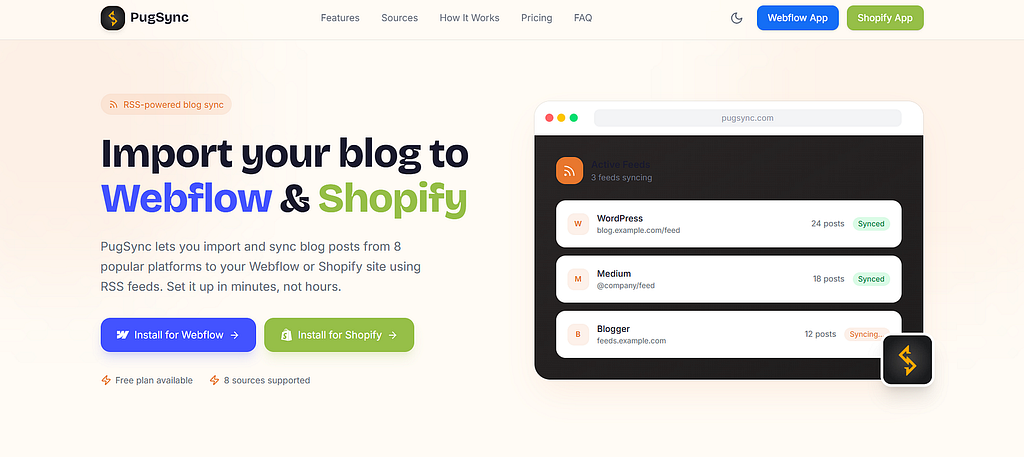
Keeping your blog content fresh across platforms doesn’t have to be a headache. PugSync lets you import and sync blog posts from 8 popular platforms (including Medium, WordPress, and Squarespace) to your Webflow or Shopify site using RSS feeds. With CDN image hosting, AutoSync, and flexible customization, it keeps your content perfectly in sync while you focus on making it shine. You can read more about the app’s features here.
Conclusion
Auditing and refreshing your old blog posts is one of the smartest SEO moves you can make in 2026. Updated examples, relevant keywords, fixed links, and current stats make older content feel brand new, and search engines tend to prioritize recently updated pages when interest peaks. The more attention you dedicate to refreshing your archive, the more search engines will recognize that your website is active, helping it earn more authority and higher visibility.
So next time a big moment is on the horizon, take a look at what you already have before committing to writing something new. A little refresh can go a long way.
Ready to turn your blog archive into a traffic-driving machine? Black Pug Studio can help you audit, refresh, and optimize your content for real results. Get in touch today.
Is Your Old Blog Content Hurting Your SEO? was originally published in Creative by Black Pug Studio on Medium, where people are continuing the conversation by highlighting and responding to this story.