When your best content never makes it home
You spent days on that post. You researched it, wrote it, edited it twice, found the perfect images, and hit publish on Medium. It picked up a few hundred reads. Then it just sat there, on a platform you do not own, while your Shopify blog stayed empty.
That is the quiet problem with publishing on discovery platforms. Your best work grows someone else’s audience instead of your store. And the obvious fix, copying everything across by hand, turns into its own special kind of misery.
PugSync has solved this since day one. PugSync 4.0 makes it effortless, genuinely reliable, and (only if you want it) a little bit magic. It is the biggest release we have ever shipped, and it is live on Shopify now.
The problem: copy-paste hell is real
Republishing a blog post manually sounds like a two-minute job. It never is.
- Broken images. You paste the text, then realize every image is hotlinked to the original post. Delete that post later and your store article fills with broken thumbnails.
- Formatting that falls apart. Headings flatten, lists scramble, code blocks vanish. You end up rebuilding the layout block by block.
- SEO from scratch. Meta title, description, slug, alt text, excerpt. All gone. You either redo it for every post or you skip it and quietly lose ranking potential.
- The time sink. Ten minutes here, twenty there. Multiply that across a year of posts and a few sources, and you have lost entire working days to clipboard gymnastics.
The worst part is that this work is invisible. Nobody thanks you for it. It just stands between you and the thing you actually wanted: your content, on your store, working for you.
Meet PugSync 4.0: the smartest way to sync your blog
PugSync is the RSS blog sync tool that imports and automatically syncs posts from eight platforms — Medium, WordPress, Squarespace, Wix, Webflow, Blogger, Tumblr, and Shopify Blogs — straight into your Shopify or Webflow store. No copy-paste, no image re-uploads, no formatting cleanup.
You connect a source once. PugSync watches the feed, pulls in new posts, fixes the formatting, rehosts the images, and publishes to your store on your terms. That is the whole promise, and 4.0 delivers it with a level of polish and reliability we have been chasing for two years.
Here is what changed.
What’s new in PugSync 4.0
🛡️ Bulletproof sync reliability — Per-source retries, structured failure reasons, and zero silent failures. If something breaks, you know exactly what and why.
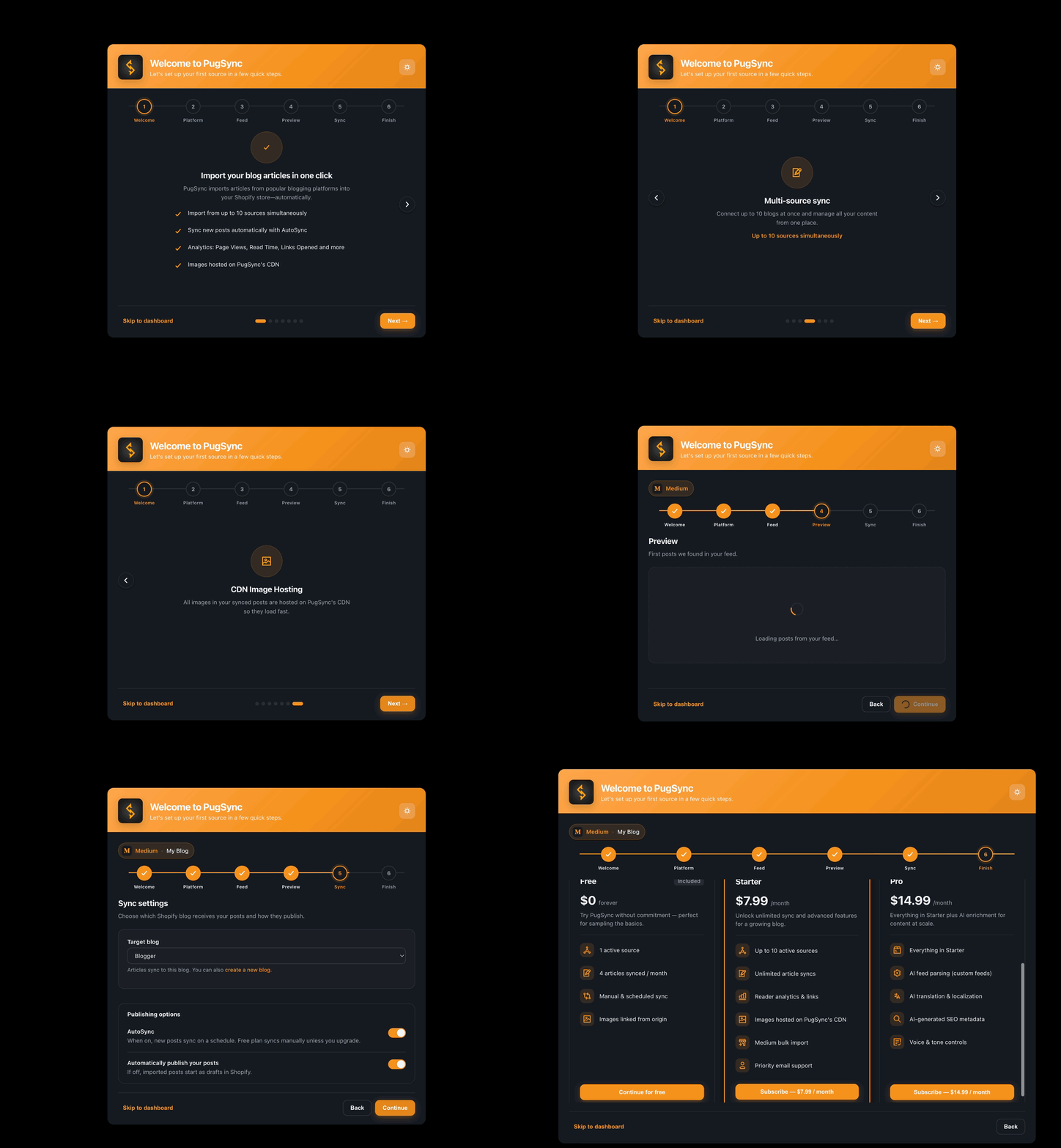
🧙 Guided 6-step onboarding — A clear, friendly wizard that takes you from install to your first live sync in minutes.
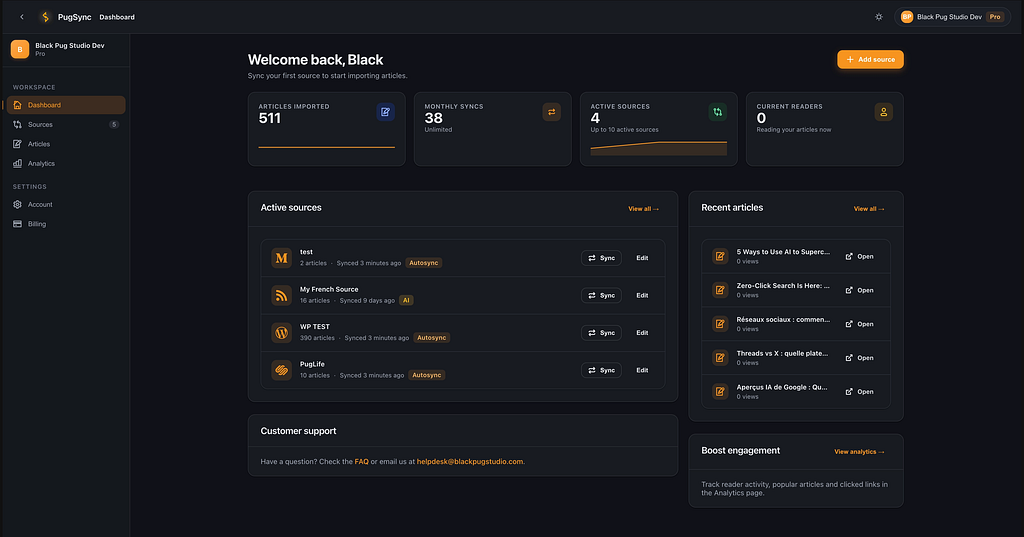
🌙 Dashboard 2.0 — Full dark mode, bulk actions, powerful search and filter, color-coded sync status, and per-source logs.
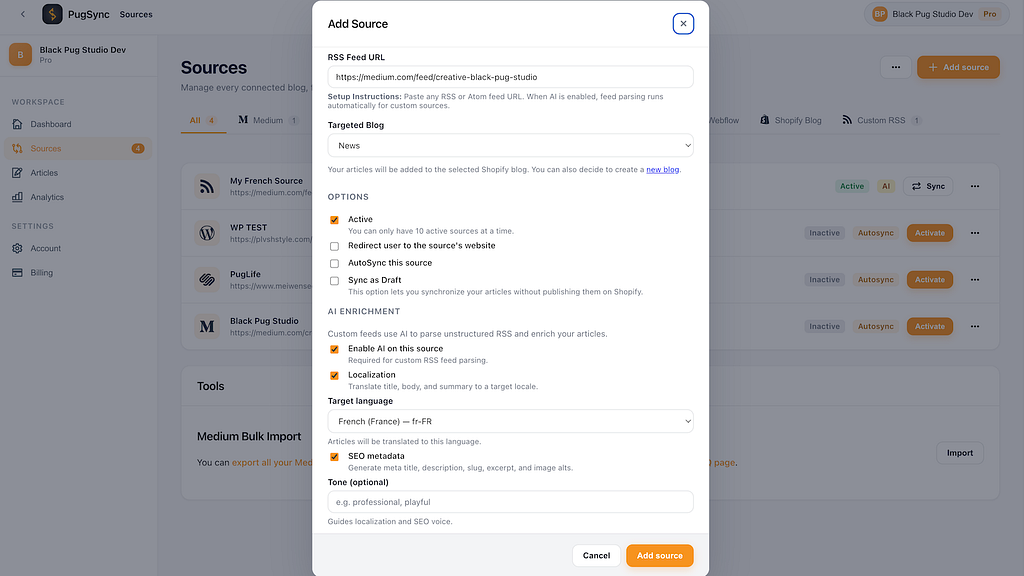
✨ AI Layering System v1 — Opt-in AI on the Pro tier: smarter feed parsing, translation, and automatic SEO fields. Off by default, on when you want it.
The headline upgrade: sync you can actually trust
Reliability is not a glamorous feature. It is the one that matters most.
In earlier versions, a single malformed post or a flaky feed could quietly stall a sync, and you would only notice when a reader pointed out the gap. We hated that. So we rebuilt the sync engine from the inside out.
PugSync 4.0 retries each source on its own schedule with exponential backoff, so a temporary blip never derails the rest of your library. When a post genuinely cannot be imported, PugSync skips it gracefully, keeps the good posts flowing, and tells you precisely what went wrong with a structured failure reason instead of a vague error.
Every sync is recorded. You get a full sync history and per-source logs, plus one-click retry when you want to try again. And because you should never have to babysit a dashboard, PugSync sends user-facing alerts by email to always keep you in the loop.
The result is a simple feeling that is surprisingly rare in software: you stop checking. It just works, and it tells you the moment it does not.
A setup that finally guides you: the 6-step wizard
Great tools should not need a manual. PugSync 4.0 ships with a guided 6-step onboarding wizard that makes the first run feel obvious.
- A short intro slider that explains what is about to happen.
- A platform picker with logos for all eight supported sources.
- Give a name to your RSS source setup and a URL to your feed
- A 6-post live preview, so you see exactly how your content will look on your store.
- Select where we should synchronize your posts and optionally turn on AutoSync and auto-publish, so you choose between hands-off automation and full manual control.
- Review your settings and select one of our plans or try PugSync for free.
No guesswork, no dead ends. Most users get from install to first sync in minutes.
Dashboard 2.0: command center, not spreadsheet
Once you are set up, you live in the dashboard, so we made it a place worth living in.
Dashboard 2.0 brings a full dark mode, bulk actions for publishing or deleting multiple posts at once, and powerful search and filter so you can find any article in seconds. A visual sync status system (green, orange, red) tells you the health of every source at a glance, toast notifications keep you posted in real time, and per-source logs give you the full story whenever you want to dig in.
It is the difference between managing your content and fighting your tools.
The AI Layering System v1: opt-in, on the Pro tier, off by default
Let us be clear about this one, because the way we built it matters as much as what it does.
The AI Layering System v1 is available on the Pro tier only, it is fully opt-in, and it is off by default. Your content is never sent anywhere for AI processing unless you switch a feature on yourself. It is powered by Google Vertex AI using Gemini models, and it solves three real headaches.
1. AI RSS feed parsing
Not every feed plays nicely. Custom blogs, older CMS setups, and non-native RSS or Atom feeds can arrive messy or half-structured. AI feed parsing reads those awkward feeds and converts them into clean, structured content, so a weird feed is no longer a reason you cannot sync a source you care about.
2. AI content localization and translation
If you sell across borders, this is the feature you will quietly fall for. PugSync can translate and culturally adapt your posts for a target market, with voice and tone controls that keep your brand sounding like you in every language. It is not a robotic word swap. It is your content, localized, with your personality intact.
3. AI SEO fields generation
This is the tedious work nobody enjoys. PugSync can automatically generate optimized meta titles, meta descriptions, slugs, excerpts, alt text suggestions, and thumbnail recommendations for every imported post. You publish content that is search-ready on arrival, instead of promising yourself you will fix the SEO later (you will not).
Pro includes 150 AI-processed articles per month, so you can apply this where it counts without watching a meter.
How PugSync 4.0 works
- Install PugSync on your Shopify store or Webflow site and open the onboarding wizard.
- Pick your platform and paste your RSS URL. The live validator confirms the feed before you move on.
- Preview three real posts to see exactly how your content will land on your store.
- Choose your automation. Flip on AutoSync and auto-publish for a fully hands-off pipeline, or keep manual control and approve posts yourself.
- Let it run. New posts sync automatically, images are rehosted to PugSync’s CDN, and you get alerted if anything ever needs your attention.
That is it. Set it up once, then go back to writing.
Pricing and plans
Simple, transparent, and priced in euro from our base in Ireland. No surprises, no hidden tiers.
Free — €0 forever
Includes 1 RSS source and 4 synchronized posts from any of our supported sources.
Starter — €7.99/mo or €79.99/yr
Up to 10 RSS sources with unlimited articles, analytics, CDN image hosting and access to our Medium bulk import tool.
Pro — €14.99/mo or €149.99/yr
Everything in Starter plus AI-powered SEO, AI RSS importer and AI localization for up to 150 AI-processed articles/month with priority customer support.
Already on PugSync v3? You are fully grandfathered. Your price stays exactly the same, and you keep a legacy badge on your account. Loyalty should cost you nothing, because it should.
On paid plans, images are hosted on PugSync’s reliable CDN — so your content stays intact even if the original post is deleted — and built-in analytics (page views, average read time, links opened, current readers, and more) show you how your synced content actually performs.
Who PugSync 4.0 is for
PugSync earns its keep for anyone whose words live in more than one place.
- Content creators and bloggers who built an audience on Medium or WordPress and want that same content working on their own store.
- E-commerce brands running a Shopify blog who want their editorial content to feed sales, not gather dust.
- Marketing agencies managing publishing for multiple clients across multiple platforms, who need reliability and clear logs they can trust.
- Shopify and Webflow users who publish on discovery platforms first, then want it all mirrored on the site they own.
If you write once and wish it appeared everywhere, you are exactly who we built this for.
What early users are saying
PugSync holds a 4.0 rating on the Shopify App Store from its first wave of reviews, and the early feedback has shaped this release more than anything else.
“Very easy to use and fast customer support! We’ve got all our articles synchronized and it makes things so much better for our marketing team. Honestly, we didn’t see ourselves copy/paste all our publications one by one from Medium. Thank you!”
— Velvet Valkyrie on Shopify, Ireland ⭐⭐⭐⭐⭐
“I was a little hesitant at first. There were a number of Medium import apps I attempted to use that didn’t work out effectively. This application was great at the beginning and has only become better over time. EXCELLENT value. The development team is also superb. Incredibly helpful and considerate and always focused on the best customer experience. Absolutely a service I look to continue to use in the future.”
— Harrison Wendland on Shopify, United States ⭐⭐⭐⭐⭐
The theme we hear most often is relief. People stop dreading republishing, because it stops being a chore they have to remember. That is the bar we hold ourselves to.
Frequently asked questions
Which platforms can I sync from?
Eight: Medium, WordPress, Squarespace, Wix, Webflow, Blogger, Tumblr, and Shopify Blogs. You sync into Shopify today, with Webflow support arriving in a later phase.
Do I have to use the AI features?
No. The AI Layering System is Pro-only, opt-in, and off by default. Nothing is sent for AI processing unless you turn a feature on yourself.
What happens to my images if I delete the original post?
On paid plans, your images are rehosted to PugSync’s CDN, so your store article stays intact even if the source post disappears.
Is there really a free plan with no expiry?
Yes. Free is €0 forever with one RSS source and 4 post synchronizations. No trial clock, no expiry.
I am on the old version. Does my price change?
No. Existing v3 customers are fully grandfathered at their current price and keep a legacy badge.
What if a sync fails?
PugSync retries automatically, skips genuinely broken posts without stalling the rest, and tells you exactly what happened. You get email alerts, access to our logs, and a one-click retry button.
Can I control when posts go live?
Yes. Use AutoSync with auto-publish for a hands-off pipeline, or keep manual control and approve each post yourself.
Ready to put your blog on autopilot?
Your content already exists. It is already good. It just is not working as hard as it could, because half of it lives somewhere you do not own. PugSync 4.0 fixes that quietly, reliably, and in minutes.
Install PugSync 4.0 on Shopify and run your first sync today.
Building on Webflow? Webflow 4.0 is coming in a later phase. Get notified and you will be first in line.
We are a small, independent creative studio in Galway, and we build PugSync the way we wish more software was built: carefully, honestly, and obsessed with the people who use it.
Write once. Sync everywhere. Get back to the work that matters.
Made with care in Galway, Ireland, by Black Pug Studio.
PugSync 4.0: The AI-Powered RSS & Blog Post Sync App was originally published in Creative by Black Pug Studio on Medium, where people are continuing the conversation by highlighting and responding to this story.