As the top social media platform worldwide with 3.07 billion users, Facebook remains an essential cornerstone for social media marketing and business advertising in 2026. Its unmatched reach spans diverse demographics across continents, making it an indispensable tool to help businesses like yours - no matter what size - grow your online presence and reach new customers.
When leveraged strategically, Facebook becomes a powerful marketing platform that offers so much more than just posting updates. It enables you to build genuine connections with your customers, reach exactly the right people with targeted ads, learn valuable insights about your audience through analytics, and create engaged communities around your brand.
In this article, we’ll walk you through how to use Facebook to connect with your existing network and grow your customer base, boost brand awareness, drive website traffic, and accelerate your business growth through both organic and paid strategies.
Why you should market on Facebook
Facebook is an extremely valuable social media channel due to its massive worldwide reach. According to survey data, 74% of respondents use Meta platforms to find new brands or products, which is nearly double the 41% who discover them through brand websites directly. There are also free tools available on Meta to help grow your business and connect with your customers.
Meta is also constantly rolling out new updates to enhance the business marketing experience. For example, they recently announced a premium experience coming to Instagram, Facebook, and WhatsApp that’ll give you access to special features and even more control over how you share and connect, while keeping the core experiences will stay free.
With over 200 million businesses now using Meta apps to stay connected with their customers, Facebook keeps getting better and better as a marketing platform that grows alongside changing consumer behaviors and new technology. What’s great about this social media channel is how it gives you so many ways to reach your audience — whether that’s through organic posts on your business page, engaging communities in groups, or running targeted paid ads.
All of these options work together beautifully to help you find your ideal customers and build meaningful, long-lasting relationships that help your business thrive.
Step 1: Create a strong Business Page

Think of your Facebook business profile as a landing page where you get discovered by potential customers. Most importantly, it allows you to set up Facebook Shop to sell products directly on the platform, run Meta ads to reach targeted audiences across Facebook and Instagram, and access powerful analytics to track your Page’s performance and audience insights.
In order to create a Business Page, you will need to log into or create a personal Facebook page first - any information from your personal profile won’t be visible on it. As you’re setting everything up, keep in mind that most people will view your Page on their phones, so make sure everything looks great on mobile.
To make a good first impression, you will need to have the following sections filled out:
- Page name: Your business or brand name that will be displayed at the top of your Page
- Username: A unique handle (e.g., @YourBusiness) that makes your Page easy to find and share
- Profile image: A recognizable logo or image that represents your brand, typically 180x180 pixels
- Cover image: Use a high-quality image of your products, services, or current campaign, minimum 400x150 pixels.
- Category: The type of business or organization you are (e.g., “Marketing Agency” or “Retail Company”)
- About section: A brief description of your business, what you offer, and what makes you unique
- Call-to-action: This button can be added to the top of your Page to direct your visitors to your website or product page
- Photo strip: A collection of images showcased below your cover photo that highlight your products, services, or brand personality
- Contact Information: Phone number, email, and physical address so customers can easily reach you
- Link: Your website URL or a landing page where visitors can learn more about your business
Pin important posts - such as announcements or major updates - at the top of your Page. This is great for encouraging engagement and informing users of upcoming events. Additionally, you have the option to connect your Page to WhatsApp by adding a WhatsApp button. To increase the chances of your page showing up in search results, turn on recommendations to allow your Page to appear in searches for specific terms.
Step 2: Find and engage with your target audience

Facebook provides access to an exceptionally large and diverse audience, boasting 3.07 billion users across the globe. When examining the platform’s user base composition, it’s notable that more than half of all Facebook users fall into the millennial demographic category, specifically those between 25 and 45 years old, while an additional 23% of the user base is comprised of Gen Z individuals, that is, those between 18 and 24 years old.
Social listening is a wonderful way to connect with your potential customers and craft content that really resonates on Facebook. Since Facebook works as a social search engine, it’s a great idea to explore keywords and choose ones that feel authentic to your brand to help optimize your profile and content. Take a look at the keywords and phrases your competitors are using, and weave similar relevant terms into your own content to help people discover your Facebook page more easily and improve your search ranking.
Check your Page Insights tab to see your target audience demographics and when they’re most active. Post during these peak times to maximize engagement. Additionally, pay attention to how people interact with your posts - you’ll notice which content types and messages resonate best. There’s no magic formula for capturing your audience’s attention, but experimentation will reveal what works for your Facebook content strategy.
Step 3: Create a Facebook content strategy

With Meta Business Suite, you can manage your Facebook, Messenger and Instagram in the same place, as well as share and schedule content on Instagram and Facebook. It’s best practice to create actionable posts that grab your audience’s attention and drive conversions - share articles or blogs from your website, add links to an email sign-up form, or ask your audience to answer questions in the comments. Ensure you optimize your posts with keywords and add relevant hashtags in the captions to boost discoverability.
Stay consistent with your posting schedule to maximize your reach and online visibility on Facebook - creating a content calendar can really help you stay organized and on track with your updates. Adobe recommends posting 3–7 times a week, and also states that Saturday mornings and evenings typically deliver the best engagement and views. Mix things up by sharing a variety of content types to keep your audience engaged and interested.
The post types that you can share on Facebook are:
- Images/Graphics: Visual content like single photos, infographics, and branded graphics that catch attention in the feed
- Reels: Short video clips (15–30 seconds) or longer-form content that generates high engagement and has the potential to go viral
- Carousels: Multi-image or video posts that users can swipe through, ideal for showcasing multiple products or telling a story
- Text: Simple text-based posts that can spark conversation and share updates or thoughts
- Links: Posts that direct users to external websites, blogs, or landing pages with preview images
- Events: Promotional posts for upcoming events that allow users to RSVP and receive reminders
- Stories: Temporary 24-hour content that appears at the top of the feed, perfect for behind-the-scenes, time-sensitive updates or encouraging customers to take action
- Live Videos: Real-time broadcasts that let you connect with your audience instantly, perfect for Q&As, product launches/demonstrations, or behind-the-scenes content
Pro Tip: Crossposting lets you easily share your Reels, images, and stories across both Facebook and Instagram - helping you expand your reach and grow your audience on both platforms.
Facebook Groups
Facebook groups provide a direct line to your audience and are invaluable for building a loyal, engaged community around your brand. Since Facebook group members are self-selected, they’re often your most enthusiastic supporters and can become dedicated customers and advocates for your brand. Groups can either be set to Public, Private, or Hidden in search results, with the Hidden option being ideal for VIP fans or an internal team.
To attract the right members, be sure to optimize with relevant phrases for the highest chances of discoverability, like a keyword-enriched description, a compelling call-to-action, and an eye-catching cover picture.
FAQ
Do I need a personal Facebook account to create a Business Page?
Yes, you need a personal Facebook account to create a Business Page, but your personal information remains private. Your Business Page stays completely separate and professional.
What types of content can I share on Facebook?
You can share images/graphics, reels, carousels, text posts, links, events, stories, and live videos. Reels typically generate the highest engagement and have viral potential. Use Page Insights to see what resonates best with your specific audience.
What are Facebook Groups, and how can they help my business?
Facebook Groups build communities where your most engaged followers connect. They’re ideal for building loyalty and turning customers into advocates. Set them to Public, Private, or Hidden based on your needs.
What is Meta Advantage+, and should I use it?
Meta Advantage+ uses AI to automatically optimize your ad campaigns by handling audience targeting, budget allocation, creative testing, and placement distribution. It’s particularly useful for improving performance without manual work.
What is the difference between boosting a post and running Meta Ads Manager campaigns?
Boosting puts money behind existing posts for quick awareness and engagement. Ads Manager offers advanced control over targeting, placements, and conversion tracking - better for lead generation and sales.
When is the best time to post on my Facebook Business Page?
Check Page Insights to see when your followers are most active and post during those times. In general, Saturday mornings and evenings generate the most engagement. Aim for 3–7 quality posts per week - consistency matters more than frequency.
Step 4: Target with Meta Ad campaigns

Meta Ads are essential for reaching your audience, thanks to Meta’s powerful targeting capabilities. Over 10 million businesses - mostly small and medium-sized - use Meta advertising. New brands or products have an 80% greater chance of being discovered on Facebook than on brand or retailer websites. Plus, 29% of marketers report that Facebook delivers the highest return on investment among all social media platforms.
Boosting posts (turning existing content into ads) is the quickest way to boost visibility on Facebook, Messenger and Instagram. If you’re looking for more control and advanced features, you should create an Ad through Meta Ads Manager and Meta Business Suite. Your ad campaigns appear on Facebook and Instagram, and can also be shared on Messenger, WhatsApp, and Threads.
You can target your Meta ads based on demographics like gender, age, marital status, career field, or location. By installing the Meta pixel (a helpful little tracking code), you’ll be able to access data about user actions on your website, such as page views to purchases, and use this information to help improve your ad delivery and measurement.
Select any of these objectives for your ads depending on your business goals:
- Traffic: Drive visitors to your website or landing page
- Leads: Collect contact information from potential customers
- Engagement: Encourage likes, comments, shares, and interactions with your content
- Awareness: Increase brand visibility and reach new audiences
- Sales: Drive direct purchases and conversions
- App promotion: Increase app installs and in-app actions
Facebook ads use a flexible budget system, allowing you to control your spending. Costs vary based on factors like audience targeting, competition, bidding strategy, ad quality, and campaign goals, but you can change your lifetime or daily budget goal at any time.
The ad formats available to use on Meta are:
- Photo: Single image ads that showcase your product, service, or brand message with a simple, eye-catching visual
- Video: Engaging video content that can range from short clips to longer storytelling formats, perfect for demonstrations and tutorials
- Stories: Full-screen vertical ads that appear between users’ Stories, ideal for immersive, mobile-first experiences
- Messenger: Ads that appear in Facebook Messenger, allowing direct conversations and interactions with potential customers
- Carousel: Multi-image or video ads that users can swipe through, great for showcasing multiple products or features in one ad
- Slideshow: Lightweight video-like ads created from multiple images, perfect for low-bandwidth connections
- Collection: Mobile-optimized ads that feature a cover image or video with multiple product images below, enabling seamless shopping experiences
- Playables: Interactive ad format that lets users try out a mobile app or game before downloading
Step 5: Use Meta AI for optimal results

Meta AI offers a suite of dynamic AI features to help you create better content, reach the right audiences, and optimize your campaigns for maximum results. With the Meta AI app Vibes, you can create and share short-form, AI-generated videos, either by animating still images or using text prompts.
AI Translation is available for Reels, a tool that uses the sound and tone of the creator’s voice, perfectly aligned with lip-syncing, to translate videos as naturally as possible. Plus, Meta keeps adding more language options to help you reach even more people. Additionally, Meta recently launched AI-powered account support options to help people find the right information in their time of need.
With powerful Meta Advantage+ tools, you can maximise your ad performance and reach your goals with greater efficiency, and you’ll have access to personalized ad solutions that can really help boost your campaigns.
On Advantage+ creative, you can create and optimize your campaigns with AI generative tools specially for ads like image expansion, background generation, text generation, the ability to animate static images, and even music generation. Plus, there are plenty of helpful resources available to help you become an Advantage+ expert.
These advanced Advantage+ tools include:
- Audience: Automatically finds the most relevant people for your ads using Meta’s AI to expand beyond your target parameters
- Detailed targeting: Uses machine learning to optimize audience selection based on interests, demographics, and behaviors
- Placements: Automatically distributes your ads across Facebook, Instagram, Messenger, and other Meta platforms for the best performance
- Campaign budget: Dynamically allocates your budget across ad sets to maximize results
- Creative: Automatically tests different combinations of images, videos, text, and CTAs to find the best-performing versions
- Catalogue ads: Automatically show the most relevant products from your catalogue to each user
- Destination: Optimizes where users are sent (website, app, or messenger) based on their likelihood to convert
- Sales campaigns: Campaign type designed to reach people more likely to purchase your product/service and drive more sales
- App campaigns: Optimizes ad delivery to drive high-value app installs and in-app actions
- Lead campaigns: Automatically optimizes ad campaigns to find people most likely to become leads
Meta continues to refine its AI technology to comply with legal requirements and safety standards. As part of this effort, the company has restricted teen access to AI chatbot characters as part of their process to develop enhanced safety measures to prevent young users from receiving potentially harmful advice.
Step 6: Monitor Facebook Analytics
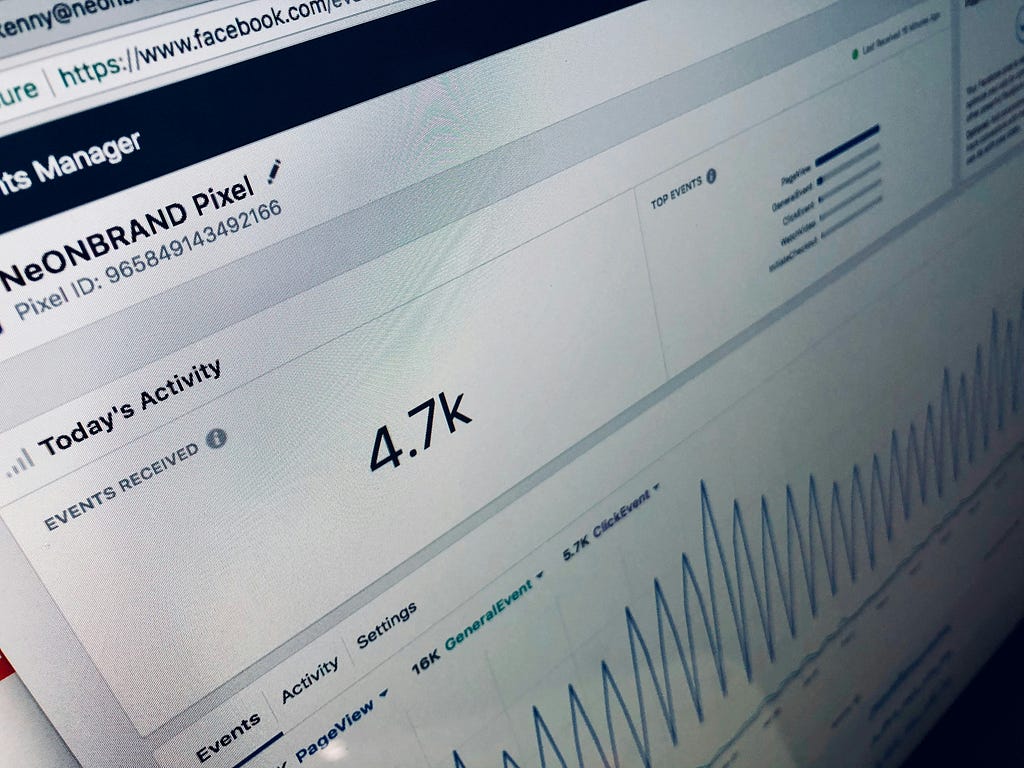
When you have a business account, you’ll get access to insights for your content performances right in Meta Business Suite. It’s packed with helpful information that gives you valuable data into your followers, content, and competitors - so you can see what’s hitting the mark and spot opportunities to do even better. Monitoring analytics is useful in the long run because it allows you to refine your Facebook marketing strategy and maximize your ROI.
Some of the most important metrics to keep an eye on for your Facebook Page and posts include:
- Followers
- Reach
- Engagement
- Impressions
- Likes
- Link clicks
- Views
- Watch time
- Average watch time
The Meta pixel tracks actions taken by users after they follow the link from your Facebook content to your website or landing page. With regards to Meta Ads, the metrics to keep an eye on are cost per result, link clicks, and reach. Additionally, the competitive analytics shares information about how your brand is performing compared to your top competitors on Facebook.
Conclusion
Facebook remains a powerful social channel and tool for businesses looking to expand their reach and connect with billions of active users worldwide. By creating a strong business page, developing a diverse content strategy, engaging with your target audience through Facebook Groups, and leveraging Meta Ad campaigns with AI-powered optimization tools, you can build a robust social media presence that drives real results in 2026.
The secret to making Facebook advertising work for you? It’s all about getting to know your audience, sharing content they’ll love, and tapping into Meta Advantage+ features to get the best results from your campaigns. Whether you’re just dipping your toes into social media marketing or you’re ready to take your Facebook strategy to the next level, the platform’s amazing targeting options and AI-powered tools make it a must-have for any digital marketing toolkit.
Ready to elevate your social media marketing strategy? Contact Black Pug Studio to discover how we can help you create engaging content and optimize your social media presence for maximum impact.
6 Facebook Marketing Tips for 2026 was originally published in Creative by Black Pug Studio on Medium, where people are continuing the conversation by highlighting and responding to this story.